Best Phone Number Extractor Chrome Extensions for Lead Generation
Looking for the best mobile number extractor extension? Check out our top picks for phone number extractor Chrome tools that help you collect leads 10x faster. Free & paid options included.

Let me ask you something — how much time do you spend every week hunting for phone numbers online?
If you're a marketer, sales rep, or business owner, I'm guessing the answer is "too much."
Copying phone numbers one by one from websites, social media profiles, and directories is boring. It's slow. And honestly, it's a waste of your time when there are tools that can do this automatically.
That's where a mobile number extractor extension comes in handy.
These Chrome extensions sit quietly in your browser. When you need phone numbers from any webpage, they pull the data for you in seconds. No manual work. No headaches.
In this post, I'll show you the best phone number extractor Chrome extensions available right now. I've tested each one myself, so you'll get honest opinions — not just marketing fluff.
Let's get into it.

What is a Phone Number Extractor Chrome Extension?
A phone number extractor Chrome extension is a simple browser tool that automatically finds and collects phone numbers from any website or webpage you visit.
Think of it like a metal detector, but for contact information.
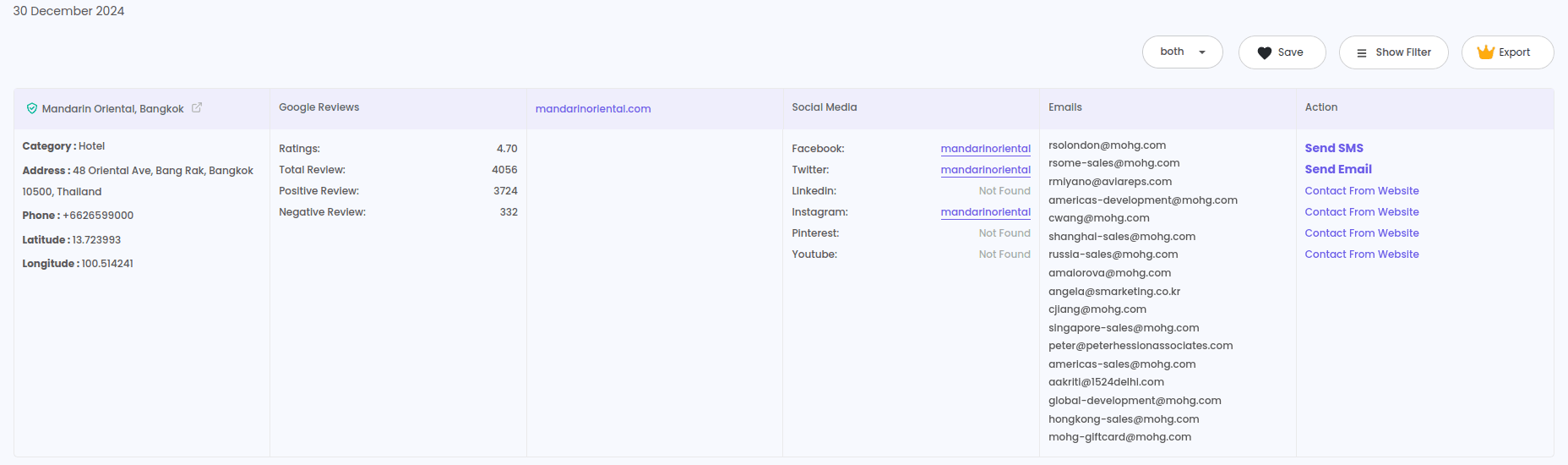
You install the extension, visit a website (could be a directory, social media platform, or business listing), click a button, and the tool scans the entire page to find all phone numbers. Then it gives you a clean list that you can export to Excel or CSV.
Some advanced tools also work as a phone number extractor & email finder combo — meaning you get both contact types in one go.
Pretty useful, right?
Why Do You Need a Mobile Number Extractor Extension?
Here's the reality: cold outreach works. But only if you have the right contact information.
Emails often go to spam. LinkedIn messages get ignored. But phone calls? They still get attention.
The problem is finding those phone numbers in the first place.
Here's why a phone number extractor free or paid tool makes sense:
1. Save Hours Every Week
Manual collection takes forever. An extension can pull 500+ numbers in the time it takes you to find 10 manually.
2. Build Targeted Lead Lists
Want phone numbers from a specific industry or location? These tools let you scrape data from targeted sources like Google Maps business listings or Instagram profiles.
3. Get Direct Access to Decision Makers
Phone numbers give you a direct line to your prospects. No gatekeepers. No waiting for email replies.
4. Works on Multiple Platforms
Good extractors work everywhere — Facebook, LinkedIn, business directories, and regular websites.
5. Cost-Effective Lead Generation
Buying lead lists is expensive. A number extractor Chrome extension lets you build your own lists at a fraction of the cost.
Top 7 Best Phone Number Extractor Chrome Extensions (2025)
I've tested over 20 different tools. Here are the ones that actually work well:
1. LeadStal Phone Number Extractor
If I had to pick just one tool, this is it.
LeadStal offers a complete suite of scraping tools — not just for phone numbers, but also emails, social profiles, and business data.
What Makes It Stand Out:
- Works on Instagram, Facebook, Google Maps, and any website
- Extracts both phone numbers and emails together
- No coding needed — just click and scrape
- Built-in email validation to remove bad contacts
- Export to CSV/Excel with one click
Best For: Agencies, sales teams, and marketers who need a reliable all-in-one tool.
Pricing:
The free plan is good for testing. But if you're serious about lead generation, the Standard plan gives you plenty of credits.
Bonus: LeadStal also includes tools like Google Maps Scraper, Bing Maps Scraper, Realtor Scraper, and Zillow Scraper — all in one subscription.
2. Lusha
Lusha is popular among B2B sales teams. It works well for finding direct dial numbers and email addresses of business professionals.
Pros:
- Good accuracy for business contacts
- Works on LinkedIn and company websites
- CRM integrations available
Cons:
- Expensive for small teams
- Limited free credits
- Focused more on B2B, not great for local businesses
Pricing: Starts at $29/month for 480 credits
3. Hunter.io Phone Finder
Hunter is known for its email finding capabilities, but they also offer phone number extraction.
Pros:
- Clean interface
- Good for company-level searches
- API available for developers
Cons:
- Phone data is limited compared to email data
- Works better for larger companies
- No social media scraping
Pricing: Free plan available. Paid starts at $49/month
4. Skrapp.io
Skrapp is another B2B-focused tool that extracts phone numbers from LinkedIn profiles and company websites.
Pros:
- LinkedIn phone number extractor Chrome extension feature
- Good for B2B prospecting
- Easy to use
Cons:
- Limited to LinkedIn and websites
- No Instagram or Facebook support
- Phone data not always available
Pricing: Starts at $49/month
5. Kaspr
Kaspr is a newer tool that's gaining popularity for LinkedIn prospecting.
Pros:
- Real-time data enrichment
- Good LinkedIn integration
- Team collaboration features
Cons:
- Only works for LinkedIn
- Can get expensive with heavy usage
- Credit system can be confusing
Pricing: Free plan available. Paid starts at €30/month
6. Apollo.io
Apollo is a sales intelligence platform with phone number extraction built in.
Pros:
- Large database of business contacts
- Built-in email sequences
- Good filtering options
Cons:
- More suited for larger teams
- Learning curve for beginners
- Phone numbers not always accurate
Pricing: Free plan available. Paid starts at $49/month
7. Snov.io
Snov.io offers email finding and phone number extraction in one platform.
Pros:
- Multi-platform support
- Good for email outreach campaigns
- Affordable pricing
Cons:
- Phone data is limited
- Works better for emails than phone numbers
- Interface can be overwhelming
Pricing: Free plan available. Paid starts at $39/month
Comparison Table: Best Phone Number Extractor Extensions
How to Use a Phone Number Extractor Chrome Extension (Step-by-Step)
Let me walk you through the process using LeadStal as an example. It's similar for most tools.
Step 1: Install the Extension
- Go to the LeadStal website
- Download the Chrome extension
- Extract the ZIP file on your computer
- Open Chrome and type
chrome://extensionsin the address bar - Turn on "Developer Mode" (top right corner)
- Click "Load Unpacked" and select the extracted folder
- Done! You'll see the extension icon in your toolbar
Step 2: Pick Your Target Source
Open the website or platform you want to scrape. This could be:
- A business directory
- Google Maps listings
- Instagram profiles
- Facebook business pages
- Any website with contact information
Step 3: Start the Extraction
- Click the LeadStal extension icon
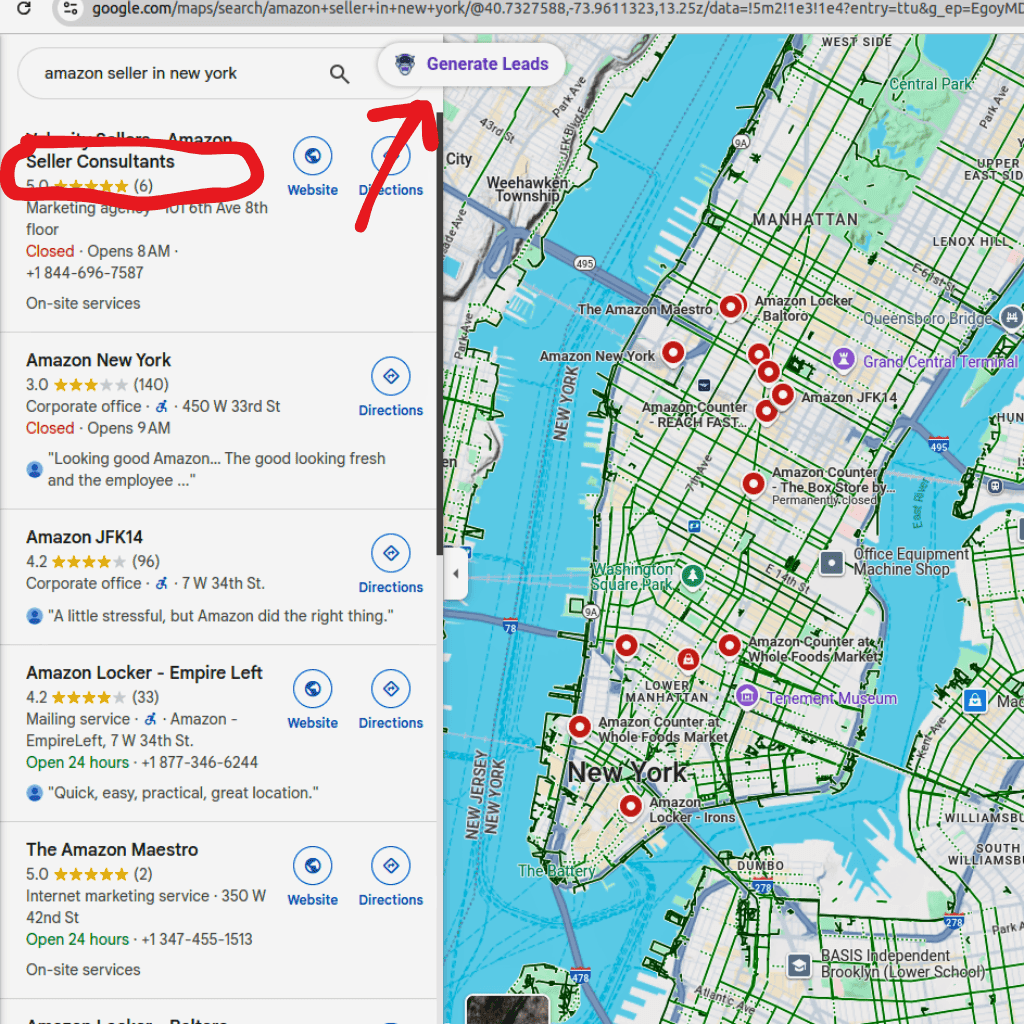
- Select "Generate Leads" or the relevant scraping option
- Wait while the tool scans the page for phone numbers
- Review the results
Step 4: Export Your Data
- Click "View Result" to see all extracted phone numbers
- Export the list as CSV or Excel
- Use the data for your outreach campaigns
That's it. Four simple steps.
Best Practices for Using Phone Number Extractors
Here are some tips I've learned from years of doing this:
✔ Target Public Profiles Only
These tools only work on publicly available information. Private accounts or protected pages won't give you data.
✔ Verify Numbers Before Calling
Not every extracted number is current. Use a verification service to clean your list before outreach.
✔ Don't Scrape Too Aggressively
Pulling thousands of numbers in one session can trigger platform restrictions. Spread your scraping over time.
✔ Follow Privacy Laws
GDPR, TCPA, and other regulations apply to phone outreach. Make sure you're compliant with your region's laws.
✔ Combine with Email Data
Phone + email gives you multiple ways to reach prospects. Tools like LeadStal's Email Extractor Extension help you collect both.
✔ Keep Your Lists Organized
Segment your contacts by source, industry, or location. It makes your outreach more targeted and effective.
Where Can You Use Extracted Phone Numbers?
Once you have your phone list, here's how you can use it:
SMS Marketing Campaigns Send promotional texts, appointment reminders, or special offers.
Cold Calling Reach out to prospects directly for sales conversations.
WhatsApp Outreach Add numbers to WhatsApp for business messaging.
Customer Follow-ups Follow up with leads who showed interest but didn't convert.
Retargeting Ads
Upload phone numbers to Facebook or Google for custom audience targeting.
Which Industries Benefit Most from Phone Number Extractors?
Almost any business that does outreach can benefit. But here are the top ones:
- Real Estate Agents — Find property sellers and buyers fast using tools like Realtor Scraper or Zillow Scraper
- Insurance Companies — Build lists of potential policy buyers
- Marketing Agencies — Collect leads for client campaigns
- Recruiters — Find candidate contact information
- E-commerce Sellers — Reach suppliers and wholesale buyers
- Local Service Businesses — Connect with nearby customers
- B2B Sales Teams — Get direct lines to decision makers
Free vs Paid Phone Number Extractors: Which Should You Choose?
Let me break this down simply:
Free Tools (Phone Number Extractor Free)
✅ Good for testing and small-scale use
✅ No financial commitment
❌ Limited features and credits
❌ Often slower or less accurate
❌ May lack export options
Paid Tools (Best Phone Number Extractor)
✅ Higher accuracy and faster speeds
✅ More credits for larger campaigns
✅ Better support and updates
✅ Advanced features like filtering and validation
❌ Monthly cost
My Recommendation:
Start with a free plan to test the tool. If it works well for your needs, upgrade to a paid plan. The time you save will easily cover the cost.
Frequently Asked Questions (FAQs)
1. Is it legal to extract phone numbers from websites?
Extracting publicly available information is generally legal. However, how you use that data matters. Always follow privacy laws like GDPR and TCPA.
2. Can I use a phone number extractor on Facebook?
Yes. A good Facebook phone number extractor can pull numbers from public profiles and business pages.
3. Does the extension work on LinkedIn?
Some extensions like LeadStal and Kaspr work as a LinkedIn phone number extractor Chrome extension. Check if the tool supports LinkedIn before you buy.
4. Will my account get banned for scraping?
Most quality tools operate within safe limits. Avoid aggressive scraping (thousands of profiles in minutes), and you should be fine.
5. Can I extract phone numbers for free?
Yes. Most tools offer a phone number extractor free plan with limited credits. Good for testing before you commit.
6. What format can I export the data in?
Most extensions let you export as CSV or Excel files.
7. Can I extract emails along with phone numbers?
Yes. Tools like LeadStal work as a phone number extractor email finder combo, giving you both contact types.
8. Does phone number extractor online work without installation?
Some tools offer web-based extraction. But Chrome extensions usually work faster and more reliably.
9. How accurate are extracted phone numbers?
Accuracy depends on the tool and source. LeadStal reports 95%+ accuracy for public data.
10. Can I use these tools for WhatsApp marketing?
Yes. Extracted phone numbers can be added to WhatsApp for business messaging campaigns.
Final Thoughts
Finding phone numbers manually is a thing of the past.
With a good mobile number extractor extension, you can build targeted lead lists in minutes instead of hours. Whether you need a Facebook phone number extractor, a LinkedIn tool, or a general website scraper — there's an option for every need.
From my testing, LeadStal offers the best value. You get phone extraction, email finding, and multiple platform scrapers in one affordable package.
But don't just take my word for it. Try the free plan yourself and see how much time you save.
Got questions? Drop them in the comments below, or connect with LeadStal on Facebook, LinkedIn, or Twitter.
Related Reads:
Put this into action, for free
Find verified leads from Google Maps, Instagram and 30+ sources with LeadStal's free tools.
Start finding leads freeComments (3)
 Priya Nair· 2 days ago
This is exactly what I needed, pulled 300 leads in my niche the same afternoon. The export to CSV worked flawlessly.