How to Extract Phone Numbers from Any Website in One Click
Need a phone number extractor from website? Learn how to pull phone numbers from any webpage in seconds using free Chrome extensions. Step-by-step guide inside.

You're looking at a business directory with 500 companies. Each listing has a phone number you need for your sales campaign. The numbers are right there on the screen.
Now imagine copying each number one by one. Click, copy, paste. Click, copy, paste. For hours.
Sounds painful, right?
This is exactly why a phone number extractor from website exists.
These tools scan any webpage and pull all phone numbers automatically. What takes hours manually takes seconds with the right tool.
In this guide, I'll show you exactly how to extract phone numbers from any website with just one click. No coding skills needed. No complicated setup. Just a simple Chrome extension that does the heavy lifting for you.
Let's get into it.
What is a Phone Number Extractor from Website?
A phone number extractor is a tool that automatically scans web pages and collects all phone numbers present on that page.
Think of it like a search function on steroids. Instead of manually looking through content, the tool reads the entire page code and identifies anything that looks like a phone number.
These extractors can recognize different phone formats:
- +1 (555) 123-4567
- 555-123-4567
- 5551234567
- +44 20 7946 0958
- (555) 123 4567
The tool collects all these variations and gives you a clean list ready to export.
Most phone number extractor Chrome tools work as browser extensions. You install them once, and they're ready whenever you need them.
Why Do You Need a Website Phone Extractor?
Manual data collection is dead. Here's why smart businesses use extraction tools:
1. Time Savings
Let me put this in real numbers:
That's not a small difference. That's days of your life back.
2. Accuracy
Humans make mistakes. After copying the 50th phone number, your eyes start playing tricks. You miss digits. You transpose numbers. You duplicate entries.
A mobile number extractor tool doesn't get tired. It pulls the exact numbers from the page every single time.
3. Scale Your Outreach
Want to reach 10,000 businesses? With manual collection, that's a full-time job for weeks.
With an extractor, you can build that list in a few afternoons.
4. Cost Reduction
Hiring someone to copy phone numbers costs money. A tool subscription costs a fraction of that — and works faster.
5. Focus on What Matters
Your time should go toward calling prospects and closing deals. Not copying numbers from websites.
Types of Websites You Can Extract Phone Numbers From
A good phone number extractor from website works on almost any site. Here are the most common sources:
Business Directories
- Yellow Pages
- Yelp
- Industry-specific directories
- Chamber of Commerce listings
Map Services
- Google Maps business listings
- Bing Maps locations
- Apple Maps (web version)
Social Media Platforms
- Instagram business profiles
- Facebook business pages
- LinkedIn company pages
Real Estate Sites
- Realtor.com agent listings
- Zillow broker pages
- Local MLS sites
Company Websites
- Contact pages
- About us sections
- Footer information
- Team pages
Government and Public Records
- Business registration databases
- Professional license lookups
- Public directories
If a website displays phone numbers, an extractor can pull them.
Best Phone Number Extractor from Website Tools (2025)
I've tested dozens of tools. Here are the ones that actually work well:
1. LeadStal Phone Extractor (Top Pick)
LeadStal offers a complete extraction suite that handles websites, social media, and maps.
What Makes It Stand Out:
- Works on any website
- Extracts phone numbers AND emails together
- Built-in Email Validator to clean data
- Export to CSV/Excel
- No coding required
- Chrome extension for easy use
Extra Tools Included:
Pricing:
1 credit = 1 valid phone number or email. Invalid data doesn't count.
Best For: Businesses that need both phone and email extraction from multiple sources.
2. Data Miner
Data Miner is a general web scraping tool that can extract phone numbers along with other data.
Pros:
- Works on most websites
- Custom scraping recipes
- Free tier available
Cons:
- Steeper learning curve
- Not phone-specific
- Requires some setup
Pricing: Free plan available. Paid starts at $19/month
3. Phone Number Extractor by AeroLeads
AeroLeads focuses on B2B contact extraction.
Pros:
- Good for business contacts
- LinkedIn integration
- CRM exports
Cons:
- Expensive for small teams
- Limited free credits
- B2B focus only
Pricing: Starts at $49/month
4. Instant Data Scraper
A free Chrome extension for basic extraction needs.
Pros:
- Completely free
- Easy to use
- Works on tables and lists
Cons:
- Less accurate for scattered data
- No phone-specific features
- Limited support
Pricing: Free
5. Web Scraper (webscraper.io)
A popular Chrome extension for general web scraping.
Pros:
- Good documentation
- Visual selector tool
- Free for basic use
Cons:
- Learning curve required
- Manual setup for each site
- Not optimized for phones
Pricing: Free extension. Cloud plans from $50/month
Quick Comparison Table
Step-by-Step: Extract Phone Numbers from Any Website
Let me walk you through the exact process using LeadStal.
Step 1: Install the Chrome Extension
First, get the tool installed:
- Visit LeadStal's website
- Download the Chrome extension file
- Unzip the downloaded file
- Open Chrome and type
chrome://extensionsin the address bar - Turn on "Developer Mode" (toggle in top right)
- Click "Load Unpacked"
- Select the unzipped folder
Done. You'll see the LeadStal icon in your browser toolbar.
Step 2: Open Your Target Website
Go to any website with phone numbers. This could be:
- A business directory page
- A company contact page
- Google Maps search results
- A list of service providers
- Any page with phone numbers displayed
For this example, let's say you're on a local business directory showing plumbers in your city.
Step 3: Run the Extractor
Here's the one-click magic:
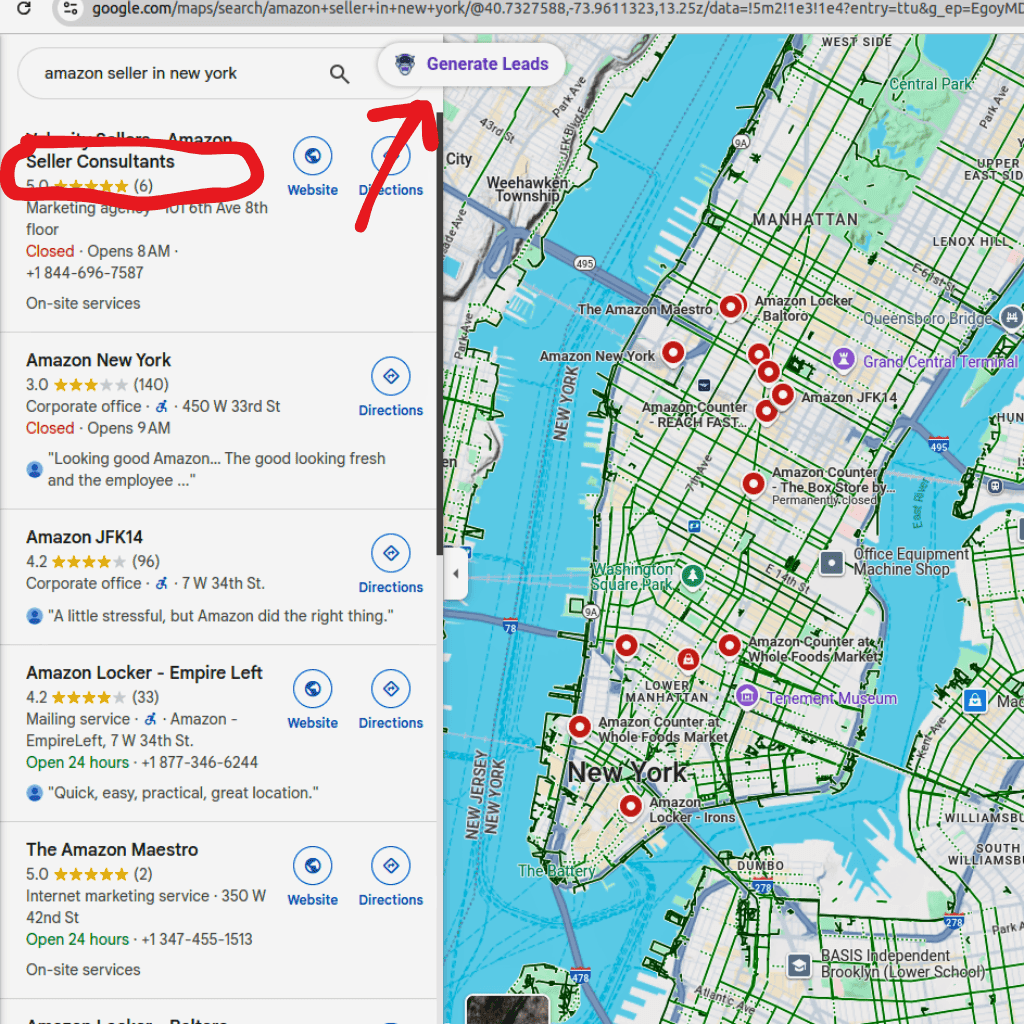
- Click the LeadStal icon in your toolbar
- Select "Extract Data" or "Generate Leads"
- Watch the tool scan the page
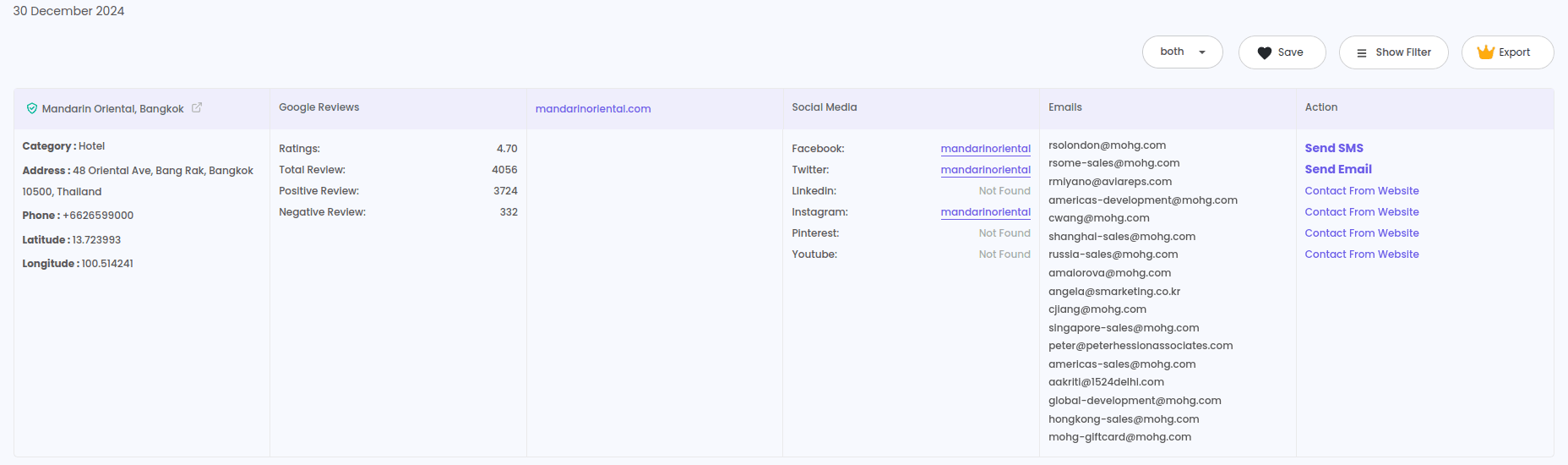
- Phone numbers appear in the results panel
The whole process takes 5-30 seconds depending on how much data is on the page.
Step 4: Review Your Results
Before exporting, check what you've collected:
- Total phone numbers found
- Any emails detected (bonus!)
- Duplicate detection
- Format consistency
Most tools show you a preview before export.
Step 5: Export Your Data
Click "Export" and choose your format:
- CSV — Works with any spreadsheet
- Excel (.xlsx) — Ready for Microsoft Excel
- Google Sheets — Direct cloud export
Your file downloads instantly. Open it and you'll see all phone numbers in clean columns.
Step 6: Validate and Organize
Before you start calling, clean your list:
- Remove duplicates
- Check for invalid formats
- Organize by location or business type
- Add to your CRM
Tools like Email Validator can help verify contact data quality.
Phone Number Extractor from Website Free Options
Budget tight? Here are legitimate free options:
1. LeadStal Free Plan
- 20 credits per month
- Full feature access
- Good for testing and small projects
2. Instant Data Scraper
- Completely free Chrome extension
- Works on structured data (tables, lists)
- No credit limits
3. Manual + Google Sheets Formula
Not an extractor, but a workaround:
- Copy page text
- Paste into Google Sheets
- Use REGEXEXTRACT formula to pull phone patterns
Formula example:
=REGEXEXTRACT(A1,"\d{3}[-.]?\d{3}[-.]?\d{4}")
This works but requires more effort.
4. Browser Developer Tools
For tech-savvy users:
- Press F12 to open Developer Tools
- Use Ctrl+F to search for phone patterns
- Copy results manually
Free but time-consuming.
Phone Number Extractor from Website Online (No Install)
Don't want to install anything? Some tools work directly in your browser:
Tools That Extract from LinkedIn:
- LeadStal — Works on public LinkedIn profiles
- Kaspr — LinkedIn-focused extractor
- Lusha — B2B contact enrichment
What You Can Extract:
- Phone numbers (if publicly listed)
- Work emails
- Company information
- Job titles
Email and Phone Number Extract: Get Both at Once
Why settle for just phone numbers?
Most businesses display both contact types. A good phone number extractor email finder combo pulls everything in one scan.
Why Collect Both:
Using both channels together increases your response rates significantly.
Tools That Extract Both:
- LeadStal — Phone + email in one tool
- Apollo.io — B2B contact database
- Snov.io — Email-focused with some phone data
LeadStal's Email Extractor Extension and Google Search Email Finder work alongside the phone extractor for complete contact collection.
Common Problems and How to Fix Them
Problem 1: Tool Can't Find Phone Numbers
Cause: Numbers might be in images or JavaScript-rendered content.
Fix: Try a different page on the same site. Or use a tool that renders JavaScript before extracting.
Problem 2: Getting Duplicate Numbers
Cause: Same number appears multiple times on the page.
Fix: Use the deduplication feature in your extractor. Or remove duplicates in Excel after export.
Problem 3: Wrong Number Formats
Cause: Different countries use different formats.
Fix: Most tools auto-format numbers. If not, use Excel's text formatting to standardize.
Problem 4: Tool Works Slowly
Cause: Page has too much content or slow internet.
Fix: Extract from smaller page sections. Or upgrade to a paid plan with faster processing.
Problem 5: Some Numbers Missing
Cause: Numbers hidden in tabs, pop-ups, or load-more sections.
Fix: Expand all content before extracting. Click "load more" buttons. Open all tabs.
Best Practices for Website Phone Extraction
Follow these rules for best results:
✔ Target Public Data Only
✔ Verify Before Calling
✔ Organize Your Lists
✔ Respect Rate Limits
✔ Stay Legal
✔ Keep Records
What to Do After Extraction
Got your phone numbers? Here's your action plan:
Step 1: Clean the List
- Remove duplicates
- Fix formatting issues
- Delete obvious invalid numbers
Step 2: Segment Your Contacts
Group by:
- Geographic location
- Business type/industry
- Company size
- Source website
Step 3: Plan Your Outreach
Decide your approach:
- Cold calls
- SMS campaigns
- WhatsApp messages
- Multi-channel (phone + email)
Step 4: Track Your Results
Record:
- Calls made
- Conversations had
- Appointments set
- Deals closed
This data helps you refine your targeting.
Frequently Asked Questions
1. Is it legal to extract phone numbers from websites?
Extracting publicly displayed information is generally legal. How you use that data matters more. Always follow telemarketing laws and privacy regulations.
2. Can I extract phone numbers from any website?
Most websites work. Some sites with heavy JavaScript or anti-scraping measures may need advanced tools.
3. What's the best free phone number extractor from website?
LeadStal's free plan (20 credits) and Instant Data Scraper (unlimited but basic) are good free options.
4. How accurate are extracted phone numbers?
Accuracy depends on the source. Numbers from business directories are usually 90%+ accurate. Random websites vary more.
5. Can I extract phone numbers and emails together?
Yes. Tools like LeadStal's Email Extractor Extension pull both contact types in one scan.
Put this into action, for free
Find verified leads from Google Maps, Instagram and 30+ sources with LeadStal's free tools.
Start finding leads freeComments (3)
 Priya Nair· 2 days ago
This is exactly what I needed, pulled 300 leads in my niche the same afternoon. The export to CSV worked flawlessly.